
Slidebox alternative: Gallery Guru vs. Slidebox, compared honestly
Short answer
Slidebox is a photo app by Slidebox LLC: swipe a photo up to trash it, down to favorite it, or tap an album to sort it. Gallery Guru is the better fit if you mainly want to delete: it splits your library into months, shows date, file size and resolution on every card and lets you check everything in a review grid before deleting. Stay with Slidebox if sorting photos into albums, iPad or Mac matter to you.
Try Gallery Guru – free with 50 swipes a day:


How we compared
We make Gallery Guru, so read this with that in mind. Everything about Slidebox comes from its App Store listing (US), its Google Play listing and the FAQ on slidebox.co, as of 21 October 2026. What we couldn’t verify is left out. Spotted something outdated? Tell us and we’ll fix it.
Gallery Guru vs. Slidebox at a glance
| Gallery Guru | Slidebox | |
|---|---|---|
| Made by | Warin Winnicke, independent developer in Hamburg | Slidebox LLC |
| Platforms | iPhone (iOS 15+), Android | iPhone and iPad (iOS 15+), Mac with Apple silicon, Android |
| How you clean up | Month by month: swipe left to delete, right to keep, undo any swipe | Swipe up to trash, down to favorite, tap an album to sort the photo |
| Before anything is deleted | Review grid of everything you swiped left, then delete all at once | Trashed photos are only marked in the app; you delete them from Slidebox’s trash |
| After deleting (iPhone) | Recently Deleted, restorable for 30 days | Recently Deleted, restorable for 30 days |
| Sorting into albums | Add-to-album button on each card | Core feature: one tap per photo, creates real Photos albums |
| Similar photos | No automatic detection | “Compare similar photos” (per listing) |
| Cloud | None – everything stays on the device | Optional cloud storage for albums (paid for more photos) |
| Paid options (US) | Free: 50 swipes a day. Pro: subscription ($19.99/year) or $49.99 once | Free download. Weekly $1.99–$2.99, yearly $19.99–$29.99, lifetime $29.99–$49.99 |
| App Store rating (US) | 5.0 (3 ratings) | 4.8 (16,641 ratings), Editors’ Choice |
| Privacy label: data used to track you | Identifiers, usage data | None declared |
| Privacy label: photos or videos collected | No | Yes, “not linked to you” (app functionality) |
| Last update | App Store 25 Sep 2026, Google Play 23 Sep 2026 | App Store 22 Sep 2026, Google Play 23 Nov 2025 |
The App Store shows up to ten in-app purchases per app; the price you see in the app may differ by country and offer.
What Gallery Guru does differently
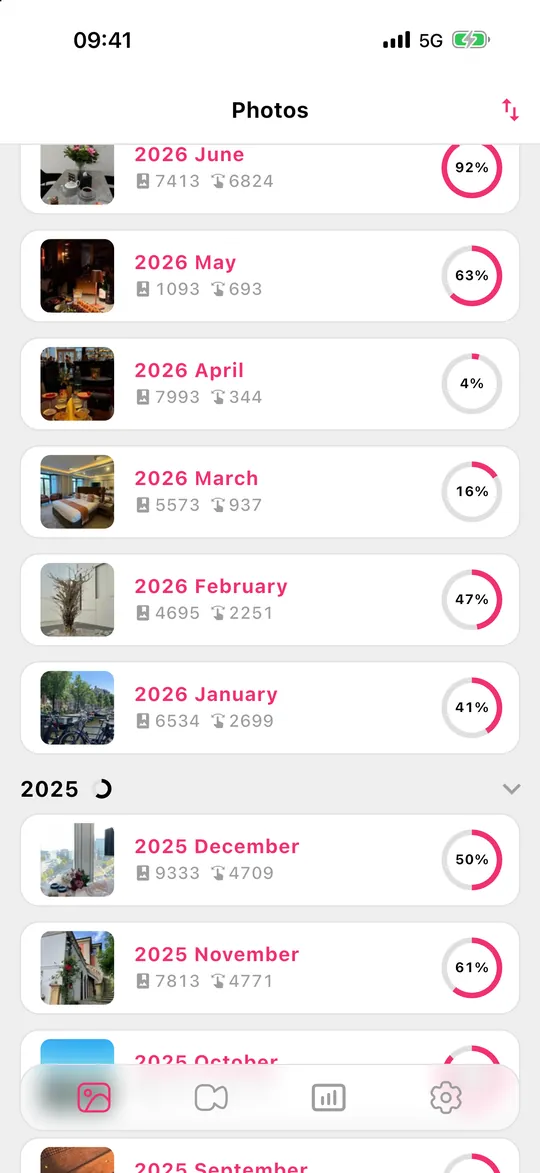
- Months instead of one big pile. Your library is split into months, each with a progress ring, so you can finish a month in a few minutes and see what’s left. Months can be sorted by date, photo count or progress.
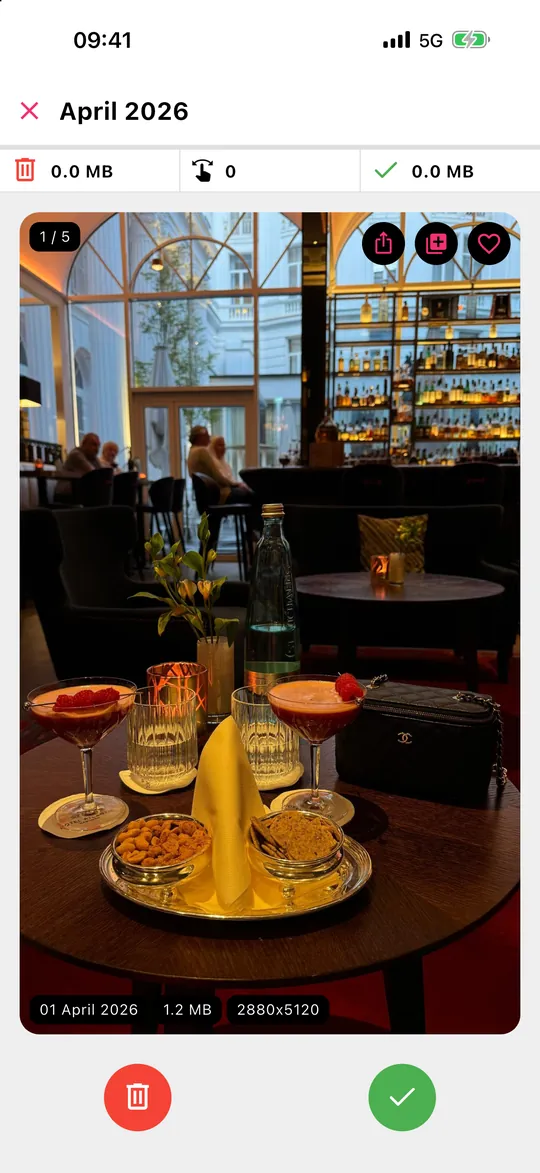
- File size on every card. Date, size and resolution are shown on each photo, so the big files stand out. Videos have their own tab (Pro).
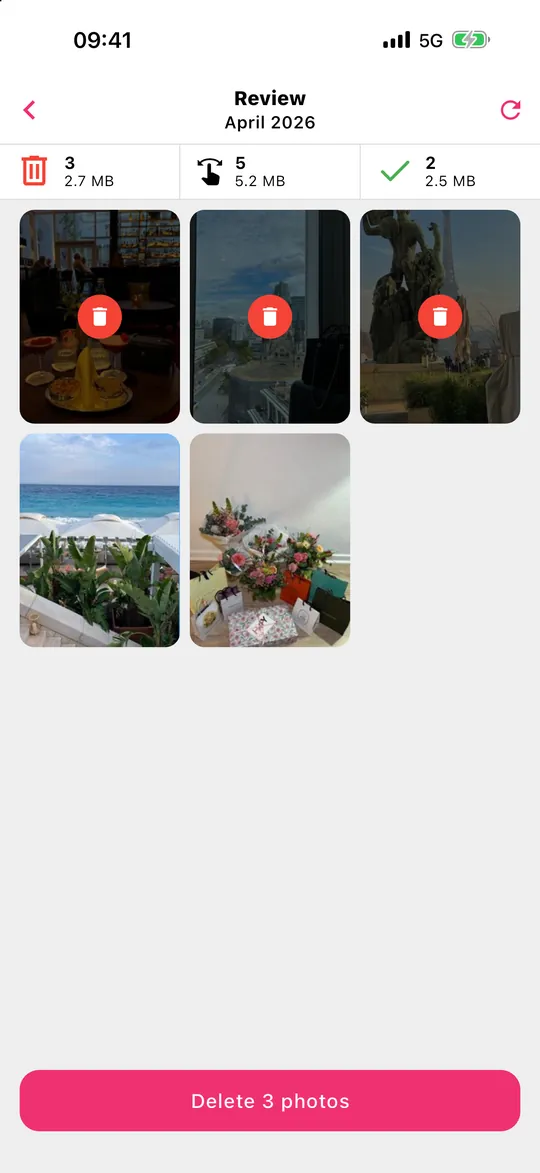
- A review step built for deleting. Swipe left to delete, right to keep; then check everything in one grid, rescue what you want and delete in one go.
- Statistics. Storage freed, photos and videos sorted, time saved.
- On the device, no account. Gallery Guru works offline and never uploads photos or videos.
When Slidebox is the better choice
- You want to sort, not just delete. Slidebox is built around albums: one tap files a photo into an album that also appears in the Photos app. Gallery Guru can add a photo to an album, but its flow is keep or delete.
- You use an iPad or a Mac. Slidebox runs on iPad and on Macs with Apple silicon; Gallery Guru is made for iPhone and Android phones.
- You want help with look-alike shots. Slidebox lets you compare similar photos. Gallery Guru has no duplicate or similar-photo detection – the iPhone’s own Duplicates album (Photos → Collections → Utilities) is a free alternative for exact copies.
- You want a cloud copy of your albums. Slidebox offers optional cloud storage for albums; Gallery Guru has no cloud at all.
- A long track record matters to you. Slidebox has been on the App Store for years, is an Editors’ Choice app and has thousands of ratings. Gallery Guru is new and has only a few.
How to switch from Slidebox to Gallery Guru
- Empty Slidebox’s trash first. Trashing in Slidebox only marks photos inside the app. Open the trash in Slidebox and delete (or recover) the photos there, otherwise they stay in your library.
- Your albums stay. According to Slidebox, albums you created there are regular albums in the Photos app (on Android: in the gallery), so they remain when you remove the app. Favorites stay marked in Photos too.
- Cancel a subscription if you have one. Deleting the app doesn’t cancel it: on iPhone go to Settings → [your name] → Subscriptions; on Android, Google Play → Payments & subscriptions.
- Install Gallery Guru and allow access to your photos. Pick a month and start swiping.
- Review and delete. Tap Review, check what you swiped left and delete it at once. On iPhone it goes to Recently Deleted for 30 days.
You can also keep both: Slidebox for sorting into albums, Gallery Guru for working through the camera roll month by month.
Honest limits of Gallery Guru
- No automatic detection of duplicates, similar or blurry photos.
- No album-first sorting workflow like Slidebox’s.
- No cloud storage or backup – make sure your photos are backed up before a big clean-up.
- The free version has 50 swipes a day (plus monthly bonus swipes); Pro removes the limit.
- With iCloud Photos on, deletions sync to all your devices – that’s true for every app that deletes through the Photos library, Slidebox included.
Frequently asked questions
What is a good alternative to Slidebox?
If you mostly want to delete photos, a month-by-month swipe app like Gallery Guru is a good alternative: it shows file sizes and has a review grid before deleting. If you want to sort into albums, Slidebox itself is hard to beat. More apps in the best apps to delete photos, compared.
Is Slidebox free?
Slidebox is free to download. Its App Store listing offers in-app purchases for more features, more than 10,000 photos and album cloud storage; in the US they include weekly ($1.99–$2.99), yearly ($19.99–$29.99) and lifetime ($29.99–$49.99) options (as of October 2026).
Is Slidebox safe?
Slidebox works with your Photos library: trashed photos are only marked inside the app, and on iPhone deleted photos go to Recently Deleted for 30 days. Its Android FAQ says deleting from Slidebox’s trash is permanent there. Its App Store privacy label declares no tracking data and lists photos or videos as collected “not linked to you” for app functionality. Check the label and the privacy policy for details.
Do my Slidebox albums stay if I delete the app?
Yes. According to Slidebox’s FAQ, albums created in Slidebox are real albums in the Photos app (Android: in the gallery), so they stay when you uninstall it. Only photos still in Slidebox’s own trash aren’t deleted – empty it first.
Can Gallery Guru sort photos into albums?
Each card has a button to add the photo to an album, so you can file a photo while you swipe. But Gallery Guru is built around keep or delete, month by month – if sorting everything into albums is your main goal, Slidebox fits better.
Is Gallery Guru on iPad or Mac?
Gallery Guru is made for iPhone (iOS 15 or later) and Android phones.
